Team and work
Tickets, inbox and messages
Requests, chats and social messages, each in the right place. A client raises a request and staff track it. The team talks in one inbox with Yukti available in any chat. Social messages and customer messages are handled with the same care as email.
What you get
5 things this does for you.
Client tickets
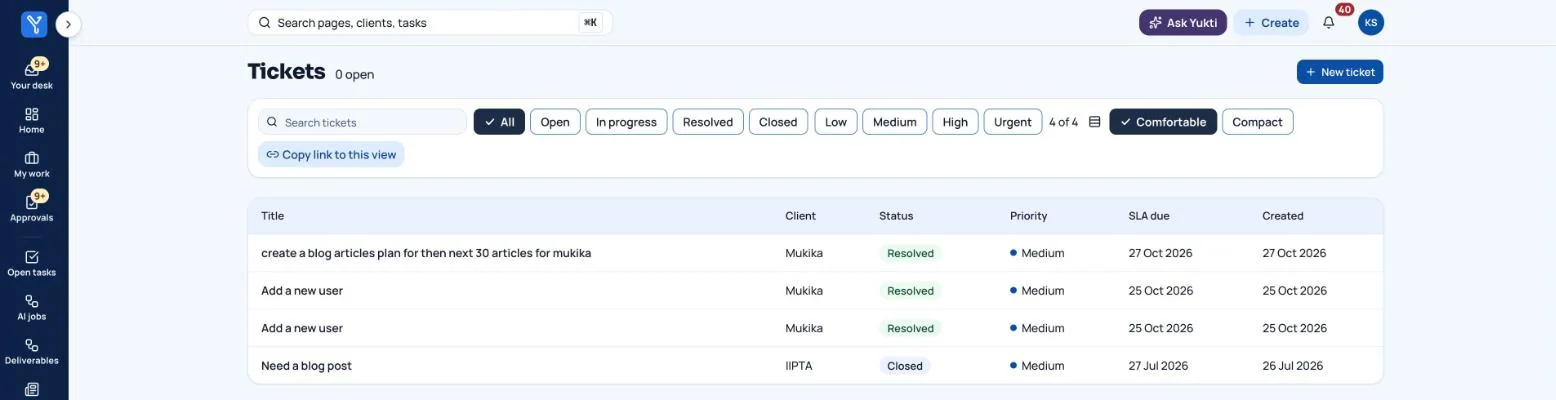
A client clicks New ticket and describes the request. Staff filter by status and priority, reply, change status, and see the SLA due date. Tickets assigned to you also show in My work.
An internal inbox
Chats with colleagues and your own private Yukti chat. Type @Yukti in any conversation and Yukti answers using only what has been said there.
A to-do list inside the inbox
Items that need you open straight in My work. Things that only tell you something happened go to the daily digest.
A social inbox
Messages and comments from social media land here first. Save a reply, ignore, resolve or mark as a lead. Nothing goes to the CRM until the manager decides a person is a real lead.
WhatsApp and SMS, with consent
Only people who said yes, a stop that always works, no messages at night and the WhatsApp 24-hour rule. Each channel is off by default.
How it works
In four steps.
No manuals needed. Each step is one screen, and the next step is always nearby.
- A client opens a ticket or a customer writes in.
- The right person is notified.
- Reply, resolve or mark as a lead.
- A lead becomes a CRM person with its source.
Where people stay in control
Messaging is off until you switch it on and add the keys. The app never sends a test message by itself.
Want tickets, inbox and messages on your business?
We are onboarding a small number of businesses for early access. Tell us what you do and what you would like off your plate.